


As shown in the Android beta version 2.26.16.7 on the Google Play Store, WhatsApp is set to introduce the capability to create stickers straight from photographs. This should enable the creation of stickers much more quickly.
In the past, users could make stickers by opening a picture and choosing the overflow menu’s “create sticker” option. After that, the sticker editor appeared, allowing users to alter the sticker before sending it, saving it, or designating it as a favorite.
When users tap on an image in the most recent beta version of WhatsApp, a new menu will show up. This is how it seems. There are two choices on this menu.
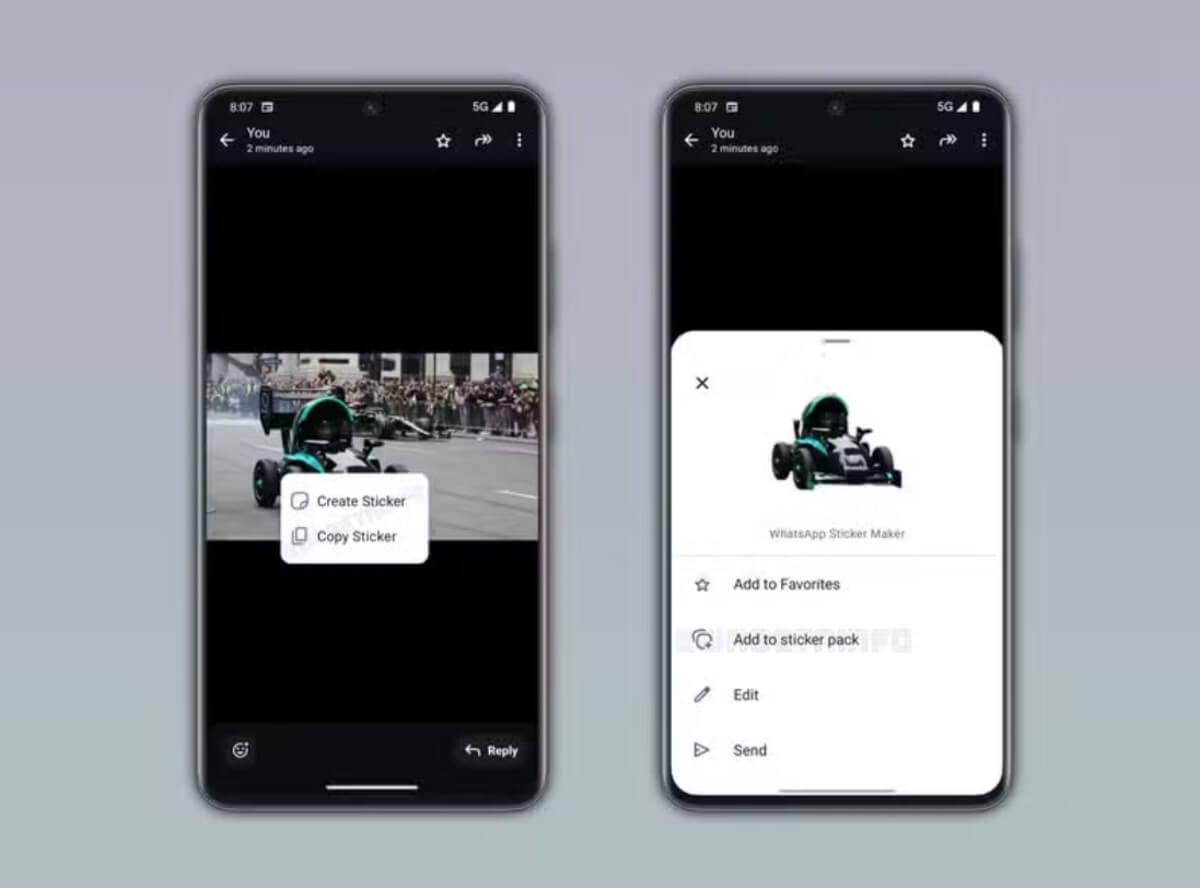
The first launches the sticker editor, which lets users select from a variety of sticker variations and alter the final product before using it. The second option uses the version of the image that WhatsApp deems most appropriate to automatically make a sticker.
WhatsApp displays a bottom sheet with multiple actions after creating the sticker. The sticker can be sent directly in the current chat, saved to a sticker pack, added to favorites, and edited further. The purpose of this shortcut is to expedite the manufacture of stickers by reducing the number of manual procedures. Users will still see the reaction tray if the feature is not enabled.
The subject extraction tools that are currently available on iOS function similarly to the new Android capability. With an iPhone, users may separate a subject from an image and use it to make stickers in compatible apps like WhatsApp.
Android users can now enjoy a similar experience with WhatsApp. Some beta testers using WhatsApp beta for Android version 2.26.16.7 can now access the feature. Over the next few weeks, WhatsApp is anticipated to progressively increase access.